Some great resources:
The incredible video series from Harrison.
https://www.youtube.com/watch?v=FLZvOKSCkxY&index=1&list=PLQVvvaa0QuDf2JswnfiGkliBInZnIC4HL
This take you through the theory of NLP with NLTK.
And from the same nice chap,
https://pythonprogramming.net/data-analysis-tutorials/
Another very good lecture:
https://www.youtube.com/watch?v=itKNpCPHq3I
District Data Labs exercises from a workshop.
https://github.com/DistrictDataLabs/intro-to-nltk
A talk on product categorisation
https://www.youtube.com/watch?v=Xg8UtTgziZE
Friday, September 9, 2016

Some useful NLP Python libraries
NLTK is the first port of call for me. It is the core for all NLP stuff. Even production work.
Text blob https://textblob.readthedocs.io/en/dev/
This uses NLTK under the hood and is a useful API for Nltk.
Pattern http://www.clips.ua.ac.be/pattern This is not Python3 yet. It is a web inning module.
Gensim - http://radimrehurek.com/gensim/ Topic modelling. Analyse plain-text documents for semantic structure. Good for unsupervised or topic modelling.
SciKitLearn
Useful for supervised learning and Classifiers.
MITIE - https://github.com/mit-nlp/MITIE Library for information extraction. Written in C++ but callable from R, Python, C, ...
SpaCy
A newish project with a good future. Vector models for text only.
I have left out the screen scraping ones like Beautiful Soup and readability (https://pypi.python.org/pypi/readability-lxml )
There are wrappers for the Stanford CoreNLP and also for he Berkley Parser. I don't think that these parsers are free, though I might be wrong. I've not used them. I remember one of them being free for research purposes only.
Text blob https://textblob.readthedocs.io/en/dev/
This uses NLTK under the hood and is a useful API for Nltk.
Pattern http://www.clips.ua.ac.be/pattern This is not Python3 yet. It is a web inning module.
Gensim - http://radimrehurek.com/gensim/ Topic modelling. Analyse plain-text documents for semantic structure. Good for unsupervised or topic modelling.
SciKitLearn
Useful for supervised learning and Classifiers.
MITIE - https://github.com/mit-nlp/MITIE Library for information extraction. Written in C++ but callable from R, Python, C, ...
SpaCy
A newish project with a good future. Vector models for text only.
I have left out the screen scraping ones like Beautiful Soup and readability (https://pypi.python.org/pypi/readability-lxml )
There are wrappers for the Stanford CoreNLP and also for he Berkley Parser. I don't think that these parsers are free, though I might be wrong. I've not used them. I remember one of them being free for research purposes only.
Sunday, February 7, 2016
Tim Minchin - Tony the fish, to mankind.
https://www.youtube.com/watch?v=UR_Fp09NC_0
And imagine what Tony would think. Standing there on his brand new feet, on brink of the beginnings of mankind as we know it. If he could look forward, just a few, short, hundreds of millions of years, to see one of his decedents, an Israeli Jew by the name of Jesús, having a nail hammered through his feet. (The very feet that Tony provided him with), as a punishment for having a sort of schizophrenic discourse with a god who was created by man to explain the existence of feet in absence of the knowledge of the existence of Tony.
And imagine what Tony would think. Standing there on his brand new feet, on brink of the beginnings of mankind as we know it. If he could look forward, just a few, short, hundreds of millions of years, to see one of his decedents, an Israeli Jew by the name of Jesús, having a nail hammered through his feet. (The very feet that Tony provided him with), as a punishment for having a sort of schizophrenic discourse with a god who was created by man to explain the existence of feet in absence of the knowledge of the existence of Tony.
Neural Networks and Deep Learning online book
http://neuralnetworksanddeeplearning.com/index.html
I've recently got into the topic of deep learning having been interested in Neural Nets for some years. Here's a good resource. It's a free book that you can donate if you wish.
I've recently got into the topic of deep learning having been interested in Neural Nets for some years. Here's a good resource. It's a free book that you can donate if you wish.
Tuesday, December 29, 2015
How to get π Pi in OSX (use option-p)
It can be really hard to find the Pi character in the Special Character search in OSX. It it buried in the Greek alphabet in the Maths Symbols.
Option-P will print it.
Option-P will print it.
⌥ - P
How to view the Special characters in Xcode. How to get Maths characters
I'm not sure if it has recently changed, but in Xcode when you select Edit -> Emoji & Symbols you get (I think by default) this smaller Special Chars tool.
To get access to the more familiar view with a search select the icon in the top right.
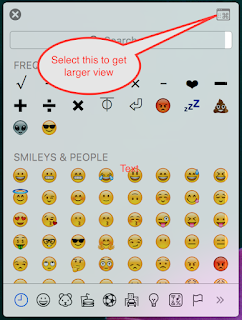
The view I am more familiar with with a search and math category.

To get access to the more familiar view with a search select the icon in the top right.

The view I am more familiar with with a search and math category.

Monday, December 28, 2015
Closures syntax simplification in Swift
I think the process of simplification for the closure syntax is quite interesting
This is an initial way of passing a function as an argument, sometime called a delegate function. The example is a simply multiplication of two numbers.
This is an initial way of passing a function as an argument, sometime called a delegate function. The example is a simply multiplication of two numbers.
func doSomething(operation: (Double, Double) -> Double) {
theReturnValue = operation( 2, 3)
}
func multiply(op1: Double, op2: Double) -> Double {
return op1 * op2
}
// The main calling of the method
DoSomething(multiply)
The first step that Swift makes to simplify this is to make the multiply function an inline function, a lambda or Closure. We place the code inline, use the "in" keyword and move the curly brace.
func doSomething(operation: (Double, Double) -> Double) {
theReturnValue = operation( 2, 3)
}
func multiply(op1: Double, op2: Double) -> Double {
return op1 * op2
}// The main calling of the method
DoSomething( { op1: Double, op2: Double) -> Double in
return op1 * op2
})
But is tidied up further because Swift, like C# in this situation, is very good with type inference. So we can remove the type declaration of the arguments and return type because it already knows them.
func doSomething(operation: (Double, Double) -> Double) {
theReturnValue = operation( 2, 3)
}
// The main calling of the method
DoSomething({ (op1:, op2:) -> in
return op1 * op2
})
Now we can tidy this up a little, by putting the return on the same line as the declaration
, but also remove the return keyword because we are returning an expression and it knows we are going to return a Double.
func doSomething(operation: (Double, Double) -> Double) {
theReturnValue = operation( 2, 3)
}
// The main calling of the method
DoSomething({ (op1:, op2:) -> in op1 * op2 })
Cool. But Swift doesn't need you to name the arguments as it will use $0 and $1 for the first two args if names are not provided. So we can write:
func doSomething(operation: (Double, Double) -> Double) {
theReturnValue = operation( 2, 3)
}
// The main calling of the method
DoSomething({ $0 * $1 })
One last thing. The last argument can be moved outside of the parenthesis.
func doSomething(operation: (Double, Double) -> Double) {
theReturnValue = operation( 2, 3)
}
// The main calling of the method
DoSomething() { $0 * $1 }
Other arguments would go inside the parenthesis of DoSomething(...), but in this case there are no other args so we can remove the parenthesis entirely.
func doSomething(operation: (Double, Double) -> Double) {
theReturnValue = operation( 2, 3)
}
// The main calling of the method
DoSomething { $0 * $1 }
Quite interesting.
Monday, December 21, 2015
How to remove backups from Time Machine
We have a few Macs in the house and a few Time Machine devices setup. As a number of Macs share a Time Machine disk I have found that one Macs' backups can monopolise the disk through one reason or another which prevents another mac from doing a backup because of lack of space.
I could have managed this better by partitioning the disk and that's something I'll do in future, but for the time being I wanted to remove some old unwanted backups to free up some space.
This can take a very long time.
To remove a specific backup I used Time Machine Utility:
sudo tmutil delete /Volumes/drive_name/Backups.backupdb/mac_name/YYYY-MM-DD-hhmmss
I compacted the remaining sparse file by using
sudo hdiutil compact [path and name of sparsefile]
You can list the backups by using:
tmutil list backups
I could have managed this better by partitioning the disk and that's something I'll do in future, but for the time being I wanted to remove some old unwanted backups to free up some space.
This can take a very long time.
To remove a specific backup I used Time Machine Utility:
sudo tmutil delete /Volumes/drive_name/Backups.backupdb/mac_name/YYYY-MM-DD-hhmmss
I compacted the remaining sparse file by using
sudo hdiutil compact [path and name of sparsefile]
You can list the backups by using:
tmutil list backups
Unavailable
If you see the time machine is unavailable then you probably have it mounted and this will prevent you from deleting files. Unmount (eject) and try again.tmutil docs
https://developer.apple.com/library/mac/documentation/Darwin/Reference/ManPages/man8/tmutil.8.htmlhdiutil docs
https://developer.apple.com/library/mac/documentation/Darwin/Reference/ManPages/man1/hdiutil.1.htmlSunday, December 20, 2015
Python Virtualenv on OSX
Install virtualenv
Johns-MBP:~ johnroberts$ pip install virtualenv
Johns-MBP:~ johnroberts$ mkdir -p ~/Virtualenvs
Johns-MBP:~ johnroberts$ mkdir -p ~/Projects
Johns-MBP:~ johnroberts$ cd ~/Virtualenvs/
Create the virtual environments
Johns-MBP:~ johnroberts$ virtualenv foobar
New python executable in foobar/bin/python2.7
Also creating executable in foobar/bin/python
Installing setuptools, pip, wheel...done.
Johns-MBP:~ johnroberts$ virtualenv -p python3 foobar-py3
Running virtualenv with interpreter /usr/local/bin/python3
Using base prefix '/usr/local/Cellar/python3/3.5.1/Frameworks/Python.framework/Versions/3.5'
New python executable in foobar-py3/bin/python3.5
Also creating executable in foobar-py3/bin/python
Installing setuptools, pip, wheel...done.
This should get Virtualenv in place.
Activate an environment
We made the Python environment, now we need to activate it.
Johns-MBP:~ johnroberts$ source foobar/bin/activate
(foobar)Johns-MBP:~ johnroberts$
Notice the "(foobar)" which shows that we are now in the environment.
What version of python are we using
We can check which version of python
(foobar)Johns-MBP:~ johnroberts$ which python
/Users/johnroberts/foobar/bin/python
This shows that we are using python from our environment.
(foobar)Johns-MBP:~ johnroberts$ python --version
Python 2.7.10
We can also check pip
(foobar)Johns-MBP:~ johnroberts$ which pip
/Users/johnroberts/foobar/bin/pip
Use pip to see what packages are here
(foobar)Johns-MBP:~ johnroberts$ pip list
pip (7.1.2)
setuptools (18.2)
wheel (0.24.0)
If I did pip list outside of this environment I'd get a lot of packages (I won't list them here)
Install the packages for this environment
(foobar)Johns-MBP:~ johnroberts$ pip install numpy
Collecting numpy
Downloading numpy-1.10.2-cp27-none-macosx_10_6_intel.macosx_10_9_intel.macosx_10_9_x86_64.macosx_10_10_intel.macosx_10_10_x86_64.whl (3.7MB)
100% |████████████████████████████████| 3.7MB 143kB/s
Installing collected packages: numpy
Successfully installed numpy-1.10.2
Cool as a cucumber.
List of Dependencies
Make a list of dependencies for this project and view it using cat
(foobar)Johns-MBP:~ johnroberts$ pip freeze --local > requirements.txt
(foobar)Johns-MBP:~ johnroberts$ cat requirements.txt
numpy==1.10.2
wheel==0.24.0
The list of dependencies is very useful for recreating other environments using pip. Create the environment and then use pip and the requirements.txt file to install the dependencies.
pip install -r requirements.txt
pip install -r requirements.txt
Get out of the environment - deactivate
We just type deactivate
(foobar)Johns-MBP:~ johnroberts$ deactivate
Johns-MBP:~ johnroberts$
Notice that "(foobar)" has been removed. We are no longer in that environment.
Remove the Virtual Environment
Once deactivated, we can remove:
Johns-MBP:~ johnroberts$ rm -rf foobar/
Simple.
Saturday, December 19, 2015
Latest Python on El Capitan
El Capitan OSX comes with Python 2.7 but you might like to get the latest version and ensure you keep it updated.
I use Homebrew which was installed before I updated Python so I won't write how to install it.
Find http://brew.sh
xcode-select --install
brew install python
pip all be installed by brew
brew install python3
I use Homebrew which was installed before I updated Python so I won't write how to install it.
Find http://brew.sh
GCC
You will need the latest GCC compiler. For that you can instal Xcode. If you instal a fresh version on Xcode you might need to run the following to install the command line tools:xcode-select --install
Python 2.7
Run the following:brew install python
pip all be installed by brew
Python 3
Run the following:brew install python3
Virtualenv
If you're running two versions of Python on the same system you may benefit from looking at virtualenv
Subscribe to:
Posts (Atom)