I have a post that describes Extension methods. It might be worth reading that first.
Example 1 - Creating a rather pointless Extension method to IEnumerable.
This example gives a method to the IEnumerable interface that will search for the first letter of a string and return the list. If you do not know what an extension method is, do read the other post. Unfortunately this post assumes knowledge of that.
Note the use of the Yield keyword. I have a post on that if you need it.
using System;
using System.Collections.Generic;
using MyExtensions;
namespace MyProgram
{
class Program
{
public static void Main (string[] args)
{
IEnumerable<string> names = new[] {"Will", "Bill", "Jill", "Bob" };
IEnumerable<string> nameThatStartwithB = names.NameBeginsWithLetter("B");
foreach (var name in nameThatStartwithB)
{
Console.WriteLine(name);
}
}
}
}
namespace MyExtensions
{
public static class NameFilterExtensions
{
//This is an Extension method for IEnumerable of string - note the "this"
// in front ot the IEnumerable.
public static IEnumerable<string> NameBeginsWithLetter(this IEnumerable<string> names,
string startChar)
{
foreach(var s in names)
{
if (s.StartsWith(startChar))
{
yield return s;
}
}
}
}
}
- Note that the NameBeginsWithLetter(..) method is a static method and has the "this" keyword. This is an Extension method for the IEnumerable interface. Exactly in the same way that LINQ operators are built. In the same why that our extension method is in a namespace, the LINQ extension methods are defined in System.Linq.
- Note in the Main() function, how our method is a "member" of the names object - and IEnumerable object.
- Also note that the namespace MyExtensions, which contains my extension method, is included in the Usings.
This example is a bit rubbish. It works but it's not very generic. The next example is more generic as we work towards a nice and elegant solution.
Making the Method Generic with Lambdas
The generic methods used by LINQ, the Select, Orderby etc. are inside the System.Linq namespace. There is an Enumerable class. In the following screen shot I have used dotPeek to decomplile the System.Core dll and in the System.Linq namespace we can get an idea of what is coming. Notice on the highlighted portion there is a bunch of generic looking <T>'s and the Func keyword. That's where we're heading though I didn't realise it till I just saw it!
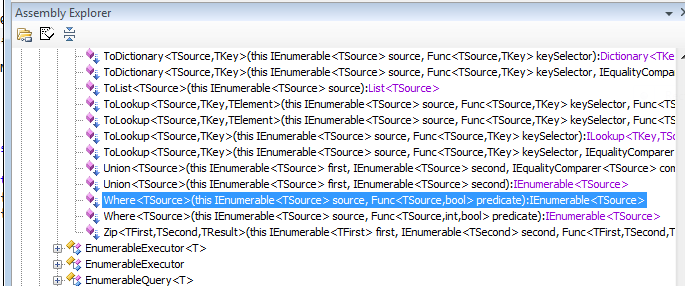
If we decomplie the Where function we can see what Microsoft have done, and it's very close to our previous example. We can see the main parts that go to making this an extension method.
public static IEnumerable<TSource> Where<TSource>(this IEnumerable<TSource> source, Func<TSource, bool> predicate)
{
if (source == null)
throw Error.ArgumentNull("source");
if (predicate == null)
throw Error.ArgumentNull("predicate");
if (source is Enumerable.Iterator<TSource>)
return ((Enumerable.Iterator<TSource>) source).Where(predicate);
if (source is TSource[])
return (IEnumerable<TSource>) new Enumerable.WhereArrayIterator<TSource>((TSource[]) source, predicate);
if (source is List<TSource>)
return (IEnumerable<TSource>) new Enumerable.WhereListIterator<TSource>((List<TSource>) source, predicate);
else
return (IEnumerable<TSource>) new Enumerable.WhereEnumerableIterator<TSource>(source, predicate);
}
In this example I have created a delegate that is passed into the Extension method. As I see it, this is an improvement in two ways. (1), if we want to filter in a different way, we can write a new delegate method and pass it in, rather than write a new Extension method on the IEnumerable object. (2), this separates the WHAT from the HOW. I mean that the Extension method says it is going to filter, but it doesn't know How it is going to filter. That, is defined by the delegate function.
namespace MyProgram
{
class Program
{
public static void Main (string[] args)
{
IEnumerable<string> names = new[] {"Will", "Bill", "Jill", "Bob" };
//IEnumerable<string> nameThatStartwithB = names.NameBeginsWithLetter("B");
IEnumerable<string> nameThatStartwithB = names.Filter(NameBeginsWithLetterB);
foreach (var name in nameThatStartwithB)
{
Console.WriteLine(name);
}
}
// This can be passed to the extension method. It is a bit more flexible
// because we can write another method like this rather than anther
// extension method.
static bool NameBeginsWithLetterB(string name)
{
return name.StartsWith("B");
}
}
}
namespace MyExtensions
{
public static class NameFilterExtensions
{
// Notice this delegate function
// Notice this delegate function
public delegate bool MyFilterDelegate<T> (T item);
// Notice that the delegate is passed into the extension method
public static IEnumerable<T> Filter<T>(this IEnumerable<T> src, MyFilterDelegate<T> predicate)
{
foreach(var i in src)
{
if (predicate(i)) yield return i;
}
}
}
}
Example 3 - Anonymous Delegates
I think that Anonymous functions, or anonymous delegates are so called because they do not appear in the call stack. They are "in-line" a-la functional programming. In this example we can use the in-line Delegate. This is now looking more like the LINQ syntax.
namespace MyProgram
{
class Program
{
public static void Main (string[] args)
{
IEnumerable<string> names = new[] {"Will", "Bill", "Jill", "Bob" };
//IEnumerable<string> nameThatStartwithB = names.NameBeginsWithLetter("B");
//IEnumerable<string> nameThatStartwithB = names.Filter(NameBeginsWithLetterB);
IEnumerable<string> nameThatStartwithB = names.Filter(delegate (string name)
{
return name.StartsWith("B");
});
foreach (var name in nameThatStartwithB)
{
Console.WriteLine(name);
}
}
}
}
Example 4 - Remove the Delegate and use Lambdas
The designers of the language/complier decided that they could simplify the syntax for the above code and they decided that they could:
- Remove the delegate keyword because the compiler knows the user will be passing in a delegate.
- Remove the type of the parameter because we know that we are dealing with an IEnumerable of strings.
- Remove the Return keyword.
- Remove the "{ }" around the return statement.
- Add the "Goes to" operator, =>
- Remove a superflous semi colon (you'll spot that one when you write this example)
And we end up with:
IEnumerable<string> nameThatStartwithB = names.Filter( (name) => name.StartsWith("B"));
This is the lambda expression and is so much easier to type, and read.
The class in full is as follows:
namespace MyProgram
{
class Program
{
public static void Main (string[] args)
{
IEnumerable<string> names = new[] {"Will", "Bill", "Jill", "Bob" };
IEnumerable<string> nameThatStartwithB = names.Filter( (name) => name.StartsWith("B"));
foreach (var name in nameThatStartwithB)
{
Console.WriteLine(name);
}
}
}
}
Example 5 - Using Func
I have a post on Func. (Basically, Func is a type that encapsulates callable code)
We can use the Func type to simplify out Extension method. We do this by using Func to remove the delegate declaration.
Before:
namespace MyExtensions
{
public static class NameFilterExtensions
{
public delegate bool MyFilterDelegate<T> (T item);
public static IEnumerable<T> Filter<T>(this IEnumerable<T> src, MyFilterDelegate<T> predicate)
{
foreach(var i in src)
{
if (predicate(i)) yield return i;
}
}
}
}
After:
namespace MyExtensions
{
public static class NameFilterExtensions
{
public static IEnumerable<T> Filter<T>(this IEnumerable<T> src, Func<T, bool> predicate)
{
foreach(var i in src)
{
if (predicate(i)) yield return i;
}
}
}
}
And that is about it.
